Optimising AI usage
Earlier blogs on this topic are here
Who this post is NOT for
This post is not for you if your AI bills don’t pinch your pockets yet.
Who this post is for
This post is for you if you, like me, are conscious about the financial costs of using AI. If even the lowest tier of $20 is something you try to use frugally.
Background
At work, I work with a few different teams. We have had to periodically research all the available AI IDEs and tools & recommend the right one.
I have been thinking about how to optimise these costs. Here are my recommendations culled from several sources on the internet. They broadly fall in the following categories.
- Avoid going all-in
- Understand billing
- Reduce tokens
- Control context
- Choose models
- Tooling & workflows
Avoid going all-in
- Don’t pay for AI if you don’t have to. Download all the IDEs. Use them every day.
Compare & contrast. Give feedback. You will see how enshittification is already at play. For instance, Cursor, despite several users requesting it, refuses to show you statistics on how your individual sessions consume tokens. You can ONLY see your token usage at your account level. Meanwhile, both Claude & recently Copilot have added support. It is in our interests to ensure that no one company gets too large a market share. And to push for the features that help us.
- Avoid features that are too IDE-specific
“Skills” are now a standard supported by most IDEs. But memories are still not. Rather than leaving it to the IDE, extract & document them explicitly in your project. Project specific memories will have two benefits. One: you will share it with your teammates. And two: the memory now becomes tool-independent.
Understand billing
- RTFM. Review pricing regularly. Don’t stay on an IDE or plan just because you are used to it.
Copilot, Cursor, Claude all have nuances in the plans they provide.
Some like Anthropic have opaque pricing plans. Others are adding plans that seem attractive at first glance but are impractical when you read more details. Let’s take Cursor for instance. Cursor’s Team plan looks appealing for a small team, till you consider this note:
- Is allocated per user (each user gets their own $20)
- Does not transfer between team members
i.e. For most small teams (>10), you’d actually be overpaying (twice as much as the individual plans) for features you would never actually use.
Reduce tokens
- Add instructions asking the AI to be concise. Avoid summarising, etc. Enforce formats for output to discourage verbosity
- Output costs 3x as much as input.
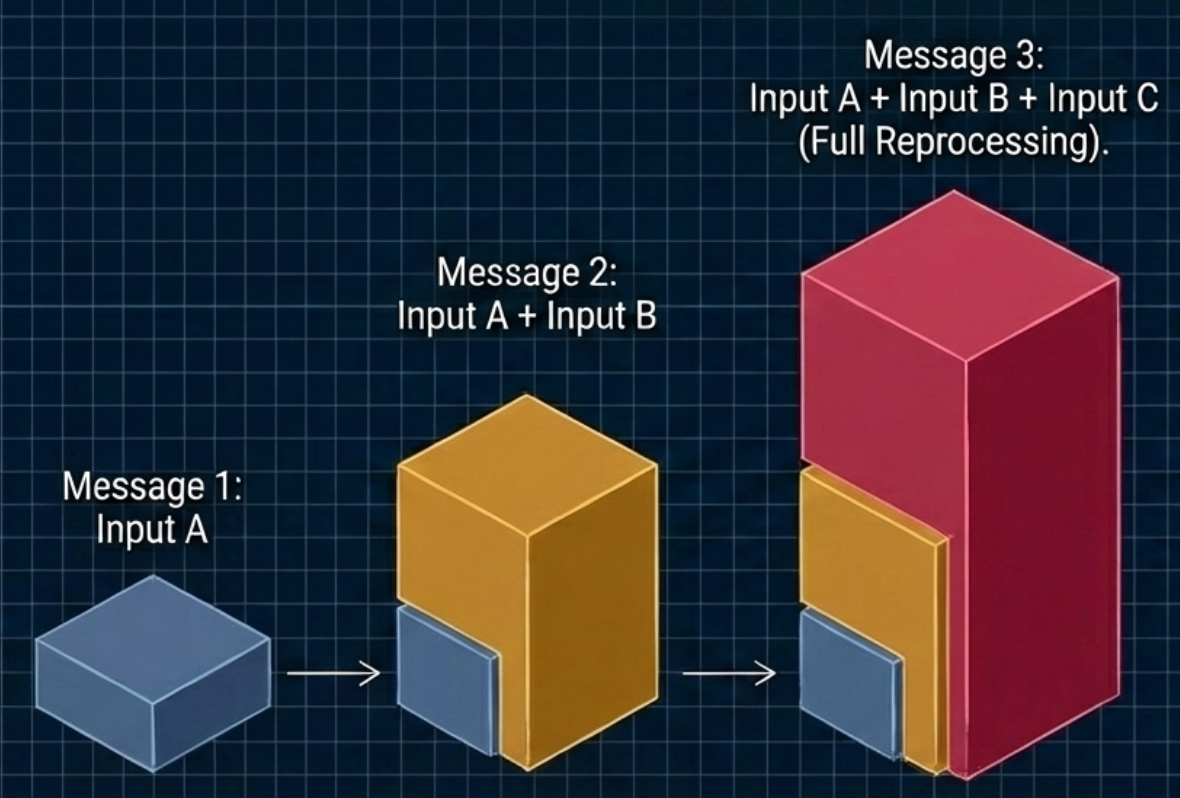
- Compact conversations often. Use
/clearbetween unrelated tasks. For complex issues, get into the habit of asking the AI to summarise a problem to a file.
Don’t wait till the context window fills up. Do this much before: ideally before 50%. Do not use conversational follow-ups like “explain again” or “tell me more,” as these simply rack up output tokens. Instead, summarize the state locally and give the model a one-line action command
- Cap “thinking” tokens
Reasoning models default to using up to 32,000 hidden tokens per request to “think”. Cap or disable it entirely for straightforward coding tasks to cut hidden costs
- Move computation out of your prompts
Do not spend tokens making the model sort data, filter lists, or calculate time differences. Compute these locally in your code and send only the results to the AI
Control context
- Use System prompts.
They are cached & do not count towards usage. Keep your static system instructions and project rules at the very top of your prompt. If you are part of a team, create & maintain system prompts & rules at a workspace level. Cursor, for instance, uses a project file called: .cursorrules. According to the references, cache reads cost only 0.1x the base input rate, offering a massive 90% discount on repeated context
- Reserve IDEs & CLIs for questions that need context. Ask open-ended questions for the web
Pre-plan in free external tools. Do your high-level architectural exploration and UI planning in free tools (like Gemini, ChatGPT, Figma, or Google Stitch) especially if your questions can be answered without access to your codebase.
- In IDEs, prefer inline edits to the chat interface
In chats, only the selected code is sent to the AI & only the diff is sent back. In contrast, in the chat panel, the entire file is sent as context.
- Limit active MCP tools.
Each enabled Model Context Protocol (MCP) tool description consumes tokens from your window. Keep your enabled MCPs under 10 per project to avoid shrinking your effective context before you even send a prompt
Choose models
- Choose the models rather than leave it to the IDE.
The ‘auto’ model selection is helpful but it’s best to be aware of what models are being used. For simple tasks, use cheaper models. Claude Code defaults to the expensive one unless you specify otherwise. Implement intelligent model routing. Do not send every request to flagship models like Opus or GPT-5.2. Route 60-90% of your simple traffic to cheaper models (like GPT-4o-mini or Haiku), and escalate to premium models only for complex tasks
- Toggle media resolution to low
When processing images for simple OCR or classification, set the resolution parameter to “low” to save tokens, unless high detail is strictly required
Tooling & workflows
- Integrate & use Local LLMs if possible.
- Use Memory
Most of the IDEs are already learning your preferences and the commands specific to your project or workflow. They store these in their own folders. Google “AI Memory” and you’ll find several skills and even libraries created by the Fifth Element. Also see the note about moving these to project-specific files.
- Use Claude’s rolling window to your advantage.
Claude’s rolling window is a feature they originally introduced to throttle users. Most hate it. Others want it in Cursor because it helps them avoid the issue of running out of all their tokens too early.
This feature is also helpful in situations where an individual license is shared between two or more people: the rolling window will help ensure that your entire month’s credits are not exhausted by one developer using AI badly.
- Solve the visibility problem with proxies and extensions
Since some IDEs hide session token stats, use local proxies like Apantli or AI gateways like LiteLLM to track token counts and spending. You can also install IDE extensions (like Claudoscope, Claude Code Usage Tracker). Going one step further, you could in theory, even configure these to block the request if the proxy determines you are going over a configured threshold of tokens
References
There are many excellent references that you can use. I particularly recommend this Youtube video by Lada Kesseler. This blog is also quite detailed. The others I used are mentioned below.
- How to Optimize Token Usage in Claude Code
- Stop Wasting Tokens: The Art of Context Engineering
- 5 Best Tools to Monitor AI Agents in 2025 - Maxim AI
- 8 LLM Observability Tools to Monitor & Evaluate AI Agents - LangSmith
- A complete guide to monitoring Claude Code in 2025 - eesel AI
- Antigravity Dashboard: Real-time quota monitoring and API proxy - Reddit
- Best way to save tokens while using AI? - Reddit
- Claude Code vs Cursor: Complete comparison guide in 2026 - Northflank
- Claude Pricing Explained: Subscription Plans & API Costs - IntuitionLabs
- Cursor Pricing Explained 2026 - Vantage
- GitHub Copilot vs Cursor vs Claude Code Pricing 2026 - ModelsLab
- How to monitor ai agent interactions with apis - Reddit
- I built an open source LLM monitoring & evaluation tool - Reddit
- Made a local proxy to track LLM API usage - Reddit
- Microsoft Copilot Pricing: Plans, Hidden Costs & Management - Reco
- Stop wasting money on AI: 10 ways to cut token usage - LogRocket Blog
- Tired of hitting Antigravity usage limits? - Reddit
- Understanding Input and Output Tokens for LLM Gateway - AssemblyAI
- What are the token limits for Claude Code? - Milvus
- Which AI tool is the most generous with tokens? - Reddit