Misc updates
Sharing a few more lessons learned (or made concrete) over the past few weeks and months.
Scripts Orchestrator
The scripts-orchestrator continues to be very useful. The original reason for it was that I had a checklist (simple things like running lint and unit tests) that I wanted my team to follow, and yet something would still be missed anyway. We could not rely on CI gates, we did not have one at the time. So we replaced the checklist items with a single one: “I have run the scripts-orchestrator”. Internally, it would run all the static checks and report pass/fail.
Since then, the project we’ve been working on has become quite complex: it evolved into a monorepo with several libraries, platforms, and disparate applications. Our code quality checks now span more than 80 commands but are still encapsulated as one command from a developer’s perspective.
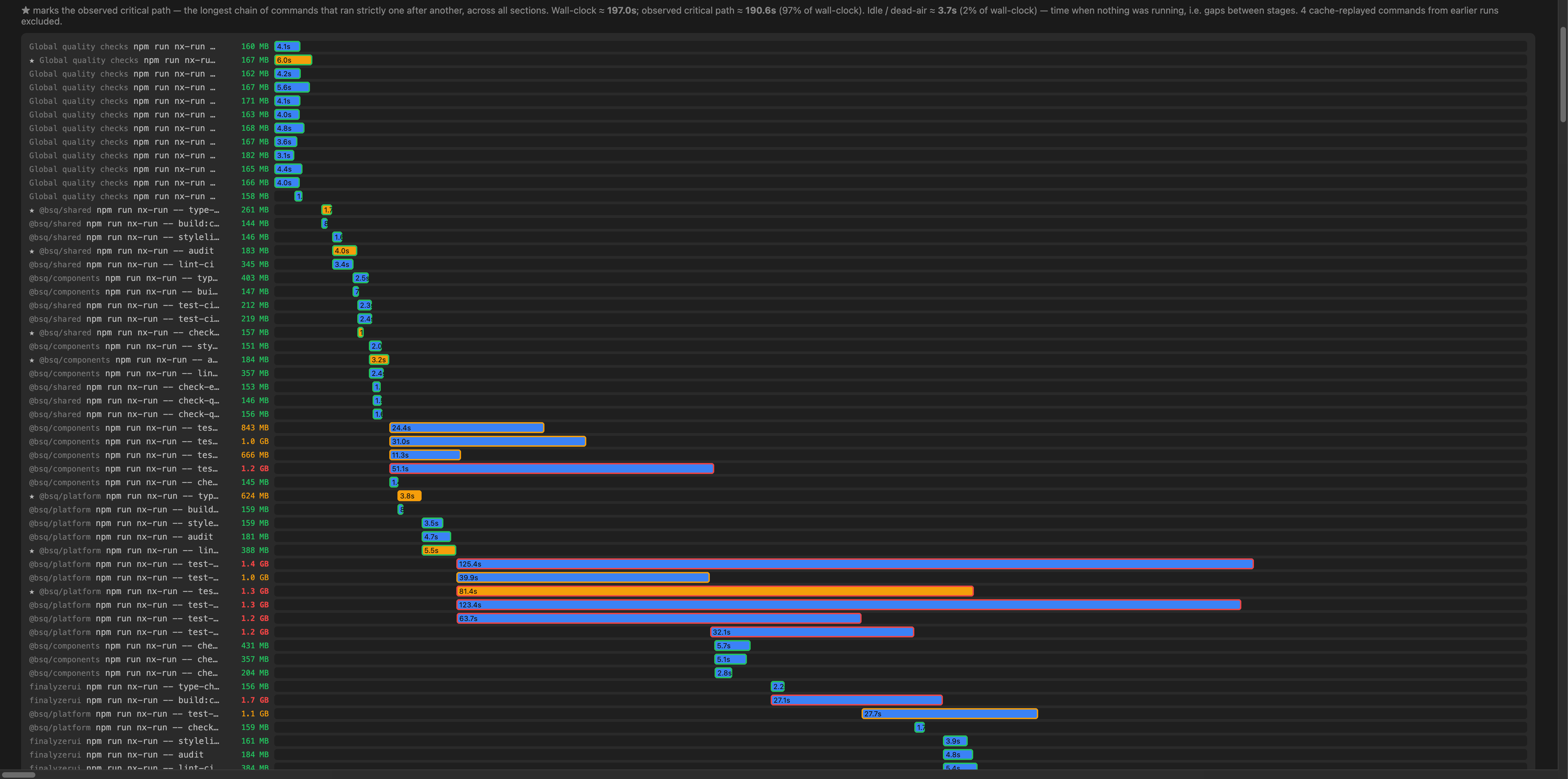
We now have several versions of the orchestrator:
- lite: for quick static code quality checks. Run on every PR (~3-9 min)
- full: lite + more expensive checks like Storybook tests. Run once a day on the main branch (~20 min). The orchestrator starts a Storybook server and then runs Storybook tests against it.
- stubbed playwright: stubbed Playwright tests that use msw to mock a backend. The goal is to thoroughly test only the UI interaction. Run once a day on the main branch (~30 min for each app).
Finally, licenses for CI pipelines came through earlier this month. We quickly evaluated several different pipeline tools (AWS CodePipeline and GitHub Actions). Since the dependencies between the command and all other complexity are fully encapsulated within the orchestrator, we were able to move quickly & evaluate several tools without spending time writing proprietary code for each tool.
Even after finalising the CI pipeline, we are seeing other benefits. The scripts-orchestrator also logs OTEL metrics: memory, CPU, so right-sizing the instance has been possible without needing access to the client’s AWS credentials or proprietary tools.
Use AI to create automation.
Using AI to create code is useful. However, I’ve seen better returns from using AI to create automation and scripts. These don’t go into production code, so they are low risk, but they help automate away a lot of work.
These automation scripts serve two other important purposes:
- They reduce our AI bill.
- They help create the harness we can then use to protect our production code from AI hallucinations during code generation.
Since they are part of our IP, I cannot share the actual scripts but here are a few examples of the patterns of scripts we’ve added.
Cross-file Static Analysis scripts
Static analysis for code typically centers on linting. ESLint, Stylelint, and TSLint all suffer from the same limitation: they only have access to the file they are evaluating. So checks which span files are not possible.
Tools like jscpd (or jsinspect) do inspect multiple files to check for issues like duplication, but there are several checks that need to span files and can be automated but have traditionally been to expensive to automate.
‘Dead code’ is a good example of this. knip is an open source tool to find unused code. However, it does not know your code and so can only do a partial job. It won’t flag a file that exports a large object when the consumer only uses certain keys (ex:, constants, API paths). Another example is when the “dead code” you are trying to find is in a format the tool does not recognize (ex: configuration, jsons, i18n locale files).
We’ve added several custom scripts that crawl our codebase and assert that such keys are actually being used. Our i18n scripts assert that all keys used in the code correspond to actual literals in the locale files, vice versa and that all keys have literals in all languages.
Coverage Baseline comparison
As projects age, entropy kicks in: test coverage drops, and code duplication increases. Tools like Sonar help you avoid this, but they need their own tooling, servers, and infrastructure. These incur costs.
What we’ve done instead is check in the generated baseline files (for tools like Jest, Playwright, and jscpd). When a pull request is raised, automation scripts check out the target branch and compare the source branch’s coverage JSON against the target’s. If coverage has increased, the baseline is automatically updated. If the branch’s coverage has dropped beyond a configurable threshold, the pull request is marked as failed. No third-party infrastructure is necessary!
Following such processes has always been possible. But with AI, creating scripts to automate baseline comparison, updates, etc is trivial.
Adding new rules & enforcing stricter rules on new code
Another common problem is when we add a new tool or rule to flag a smell or antipattern, but it flags hundreds of issues in the current code. You have no choice but to mark the rule as a warning. Developers often ignore warnings & so they are as good as useless.
We’ve added two custom scripts as workarounds:
- One script goes to each existing occurrence and adds an eslint-disable comment for that line. The new rule can now be enabled without failing for existing violations.
- If ignoring existing violations is not viable, the rule is added as a warning. Another script toggles all “warnings” to “error” and applies them only to new code added in a branch.
Code quality issues analysis & burndown
Scripts create reports of known violations in our code which are then evaluated to determine the most serious ones.
These reports are then used to prioritize developer refactoring tasks or passed to AI agents for processing.
The agent is first asked to create codemods rather than process each violation directly. The goal is to never use AI to do something repeatable.
Code review automation
We’ve been using AI to do code reviews for a while now. I’ve blogged about our learnings earlier. Experts like Addy Osmani and others have published their own skills.
We’ve approached code review from a slightly different perspective.
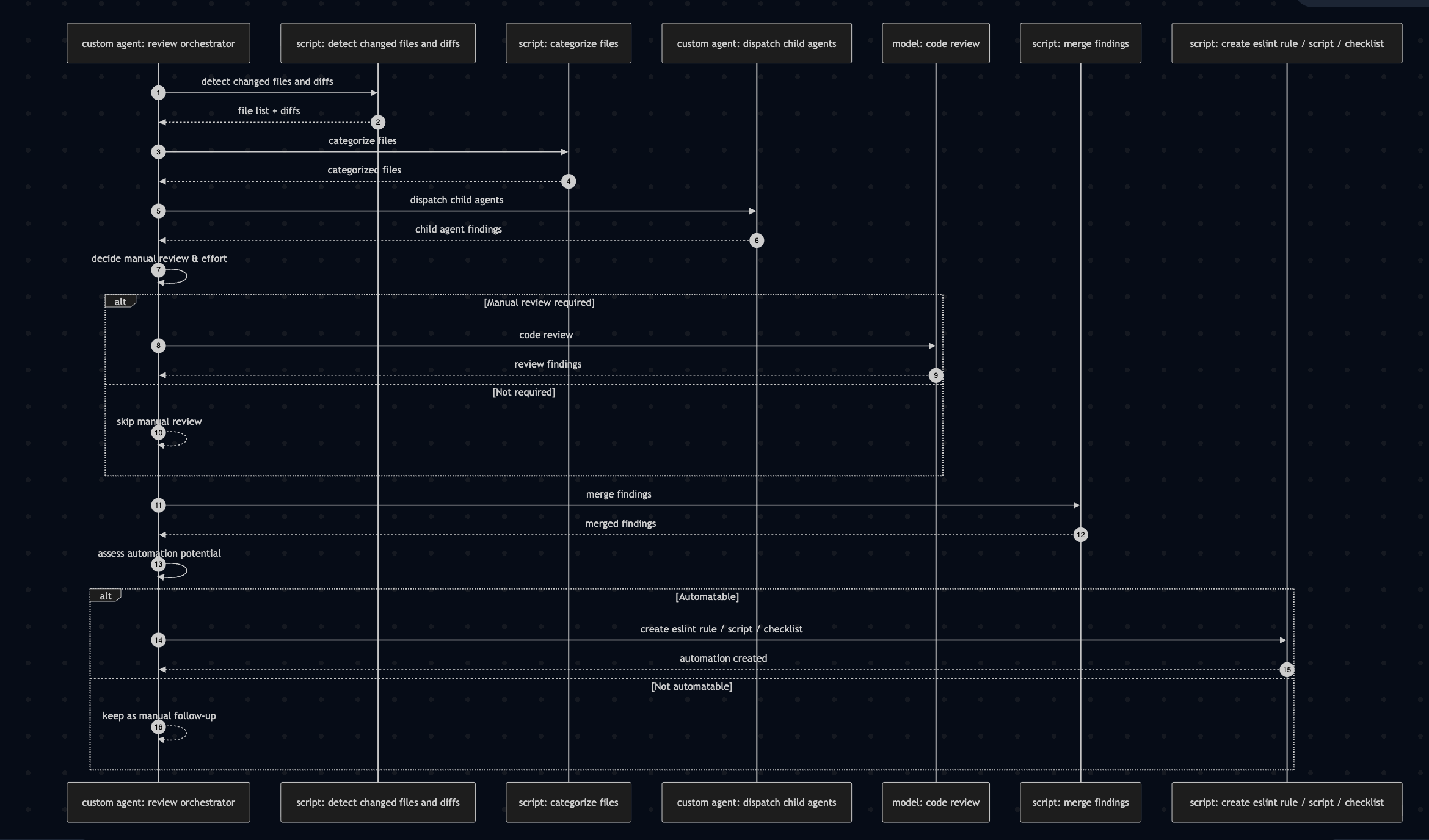
We trigger our own custom code review skill, but its primary responsibility is orchestration.
Our agent is given a playbook it strictly follows. It first invokes scripts we’ve written to find the changed code, diffs, and categorize the files. Then, it triggers several agents simultaneously.
In earlier iterations, we tried instructing the AI to invoke certain commands. The agent often ignores these instructions altogether. Now, it is given a playbook that says ‘Run this script’. Perhaps hooks will work even better.
Child agents are category-specific: they are given a class of files, for example “unit tests,” and apply our own custom standards to those files.
The goal of spawning child agents here is NOT speed but to keep each agent’s task simple & focussed.
The parent then makes a few more decisions. For instance, if the change set is large, the agent flags the files that need manual review (hat tip to Addy for this suggestion).
It also dynamically chooses the effort at which to trigger the model’s own code review skill (for example, “low” for small diffs or trivial CSS changes).
After experimenting with several different variants, this combination of our business-specific rules + generic model’s review is what is most effective for us. Having only one or the other was not as effective.
Another script is then invoked to merge all the findings into a single result.
As a final step in the review, the findings of the model’s review are put through an “automation” lens. If the code review comment discovered by the model’s agent (or by a manual reviewer) can be automated as an ESLint rule, script, or converted into a checklist, it is immediately done.
This approach of interspersing scripts and letting them handle the deterministic tasks and I/O cuts down on a lot of token usage.
Hope you find these learnings useful.